Stop Dealing With Fake Stereo Files
in Pro Tools.
MonoMate detects and converts dual mono stereo files to true mono — before you even open your session.
One-time purchase. No subscription. *Requires Mac · Windows version coming soon
The Frustrating Reality of Importing Audio
Artists and collaborators send you "stereo" files that are actually identical left and right channels.
- 1 Import the stereo file into Pro Tools
- 2 Check to see if it's actually dual mono
- 3 Split the stereo track to two mono tracks
- 4 Delete the duplicate channel
- 5 Pan the remaining one to the center
- 6 Repeat for every. single. file.
What MonoMate Does
A simple tool created by a mix engineer that saves you hours of tedious non-creative work.
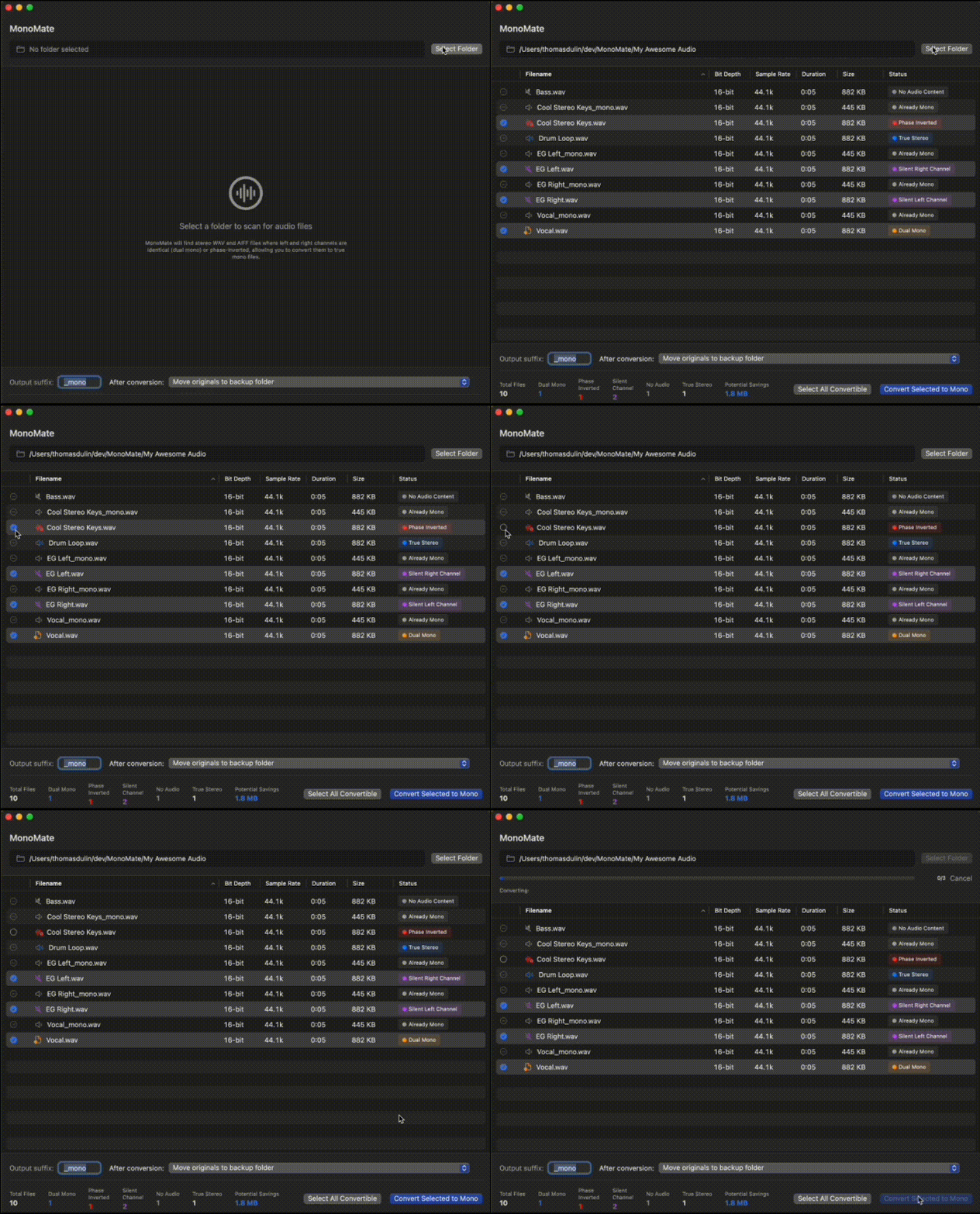
Select a folder
Drop in your stems folder or select it from Finder.
Recursive scan
MonoMate scans all audio files, including subfolders.
Detect dual mono
Identifies all stereo files where L and R are identical.
Choose files
Review and select which files to convert.
Convert to mono
Outputs true mono files with preserved quality.
No guessing. No manual checks. No Pro Tools workarounds.
Built for Audio Quality
Technical decisions that matter to engineers who care about their audio.
Bit-perfect comparison
Compares L/R channels sample-by-sample, no approximations.
No processing
No summing, no gain change — just channel extraction.
Format preservation
Preserves WAV/AIFF format, bit depth, and sample rate.
Safe by default
Real stereo files are left completely untouched.
Why MonoMate
Older tools
- Outdated code
- Slow on modern macOS
- Buggy interface
Subscription tools
- Recurring fees
- Overkill features
- Cloud dependencies
MonoMate
- Native Swift — fast on Apple Silicon
- Buy once, yours forever
- Works offline, no cloud

"I've noticed that a lot of my Tape Op reviews say, 'This will speed up my mixing process,' and many times these new apps and plug-ins certainly do help me work faster, but I can guarantee you that MonoMate will speed up the beginning of all my mix sessions... Less guesswork, less searching, less splitting to mono and deleting, and more time actually mixing. Thank you MonoMate!"
Larry Crane
Tape Op Magazine
"This is great! I've been dealing with 'stereo' tracks from Logic users for YEARS."
— Paolo
"Thank you for making this!"
— Chris
"WTF this is awesome!"
— Matthias
"What in the actual f*#^, this has truly made my week."
— Tom
"This is gold"
— Semming
"MonoMate was the biggest no-brainer buy ever. Thanks so much!"
— Tyler
Who It's For
If you've ever sighed when importing "stereo" tracks — MonoMate is for you.
Mixing Engineers
Music Producers
Post-Production Editors
Anyone Receiving Stems
macOS Native — Built with Swift for macOS Sonoma and later. Runs entirely on your machine — no cloud, no uploads.
Ready to Clean Up Your Sessions?
Stop wasting time on tedious stereo-to-mono conversions.
Buy MonoMate — $29Instant download. One-time purchase. *Requires Mac · Windows version coming soon